Agent skill: dialing in the work, four knobs at a time
You haven’t lost control. You’re just holding too much at once. On constraints, the OP-1, and dialing in what agents build, four knobs at a time, with Quadknob.

These knobs tune this page, and the third tab tunes the click they make.
I bet your feeds are like mine: Everyone is seemingly building everything, all at once.
This, of course, is enabled by the arrival of competent coding agents. What used to require months of focused work can now be done for you in an afternoon.
Even the agents themselves haven’t adjusted to their own consequences yet, as is evident when they suggest a new feature will be a week’s work. Buddy, you and I both know you’ll be done before lunch.
An entire product is one prompt away — but then what? All the small choices you used to make, one by one as you built, are now presented to you all at once, already decided.
“Is this slop?” you wonder. You want to put yourself in there too. To apply your taste, as the feeds will tell you to. But it’s everything all at once. You don’t even know where to start.
When Sune Rose Wagner and Sharin Foo started their band The Raveonettes in the early 2000s they deliberately used constraints as a creative vehicle. Some rules for their songs: they had to be in B-flat minor, use at most 3 chords per song, be around 3 minutes long, have no hi-hats and have both members singing every lyric at the same time.
Instead of being paralyzed by the openness of infinite choice, they put up some obstacles, then spent their efforts figuring out what could pass through.
In a Wikinews interview from ‘07:
Sune: What’s wrong with three chords? […]
Sharin: Yes. I think that what it comes down to is whether it strikes a chord in you and hits your gut, some kind of emotion in you, that’s really what we care about when we make music.
Just because you can get a knob for every single value in a system, doesn’t mean it’s helpful to have them all. The diminishing return on knob count is quick. The same goes for the tools we use.
Few instruments look as mysterious and playful at once as the OP-1. Here, let Jeremy from Red Means Recording give you a tour:
As soon as you see those colorful dials, you yearn to turn them. It might look like a toy but watch the video above and you’ll see it’s a capable, full-stack music production suite. Hold one and you’ll feel that, despite its quirky look, it is serious business fun.
The secret to how Swedish design firm Teenage Engineering crammed all that power into something playful and approachable is in those colorful knobs.
Every instrument and tool on the thing is controlled by the same four dials, visualized with playful illustrations. The colors map directly to what they control. This goes as much for the parameters in the echo effect as for which list is scrolled when you turn.
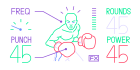
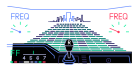
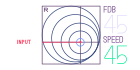
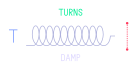
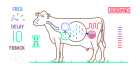
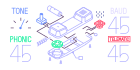
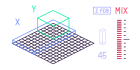
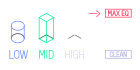
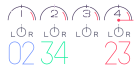
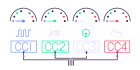
Screens from Teenage Engineering’s OP-1 module overview.
Could this map onto the work we do as developers?
Quadknob
I built a skill for coding agents in the spirit of the OP-1. It uses a consistent 4 knobs (or fewer) and divides further choice into separate pages. It tries its best to show live previews of the thing under the loupe so the effect is immediately visible. You pick which values or let the agent decide.
Invoke it like…
Open a quadknob to dial in a grid of cards, their looks, layout and typography
If you have one, connect your actual OP-1 (or any MIDI controller) and Quadknob will react to its dials.
Drag the dials with your mouse or finger or use a keyboard to control them.
For the obvious value types — colors, frames, animation and so on — Quadknob comes with helpful illustrations. It can also construct custom tools on the fly for any value or concept.
Quadknob will pick up the existing rules of your system, the design tokens, the color palette and so on. Say…
Open a quadknob for the font settings. Pick some mono ones to choose from. Another page to dial in the accent color. Include a live preview
Or…
let’s dial in the animation timing in a quadknob
There’s something about the tactility of the real knobs and direct feedback of seeing the effect of your fiddling immediately. I’ve found it works great for getting visual details just right — or to quickly switch between and compare options of the same thing.
However, the knobs can be just as helpful for visualizing or understanding logic.
Here’s a quadknob visualizing the layout modes of my macOS tilling window manager, dinky:
Turn through the layouts and watch the windows fly around. It’s a naive version of the real window manager, but it gets the idea across faster than any docs page could.
Even though agents can build everything, good products are still good products and usually what makes them so are how they feel. How they feel is determined by the choices and opinions that went into them.
Human choices feel human. I think… that what it comes down to is whether it strikes a chord in you and hits your gut, still, hopefully.
Obviously, the notion of using four knobs to control an easing curve will not cure slop on its own. But maybe it’ll help. Put yourself into the work, little by little. And if doing it 4 knobs at a time helps; great!
Quadknob (I cannot not smile when I read that name) is available as an agent skill.
Find it at github.com/githubnext/quadknob-skill.